Create a Mobile Provider
As you create a new mobile provider A transporting agency, such as EMS organizations and fire departments., you can add it to one or more preferred provider lists Used to filter specific menus so the listed providers appear at the top of the menu..
For information on adding this mobile provider to your preferred providers, refer to Preferred Providers. For information about labels Used to classify and locate specific types of patients., refer to Labels.
Creating a mobile provider includes the following steps:
-
Name and describe the provider
-
Specify general information
-
Specify location
Generally refers to the region or to a division, such as a provider facility or mobile provider. Every user is granted access to at least one location. information -
Define units or vehicles
-
Add to preferred provider lists
To name the new provider
-
On the upper right, click System Settings.
-
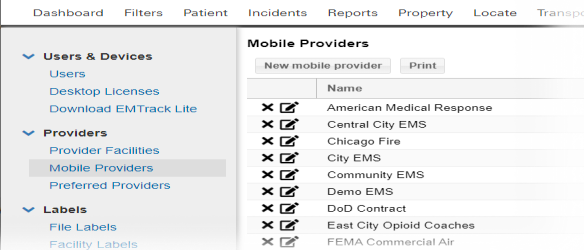
On the left, under Providers, click Mobile Providers. The Mobile Providers page opens.
-
Click New mobile provider. The New mobile provider window opens.
-
Enter the Name.
-
Enter the Description.
To specify general information
-
Click the General Information tab.
-
Enter the Agency Number.
-
Select one or more Labels.
-
To add a phone number:
-
Click Add Phone Number. The section expands.
-
Enter the Phone Number.
-
If appropriate, enter a Description.
-
Repeat these steps to add another phone number.
-
To specify location information
-
Click the Location Information tab.
-
Enter the mobile provider's information in the Street Address, City, State, and Postal Code fields.
To define units
-
Click the Units tab.
-
To add a new vehicle:
-
Click New Vehicle. The row opens in the table.
-
Enter the unit Name / Number.
- If appropriate, enter a Description.
-
Repeat these steps to add another vehicle.
-
To add to preferred provider lists
-
Click the Preferred Providers tab.
-
Select one or more preferred provider lists.
-
Click Save.
Related Concepts